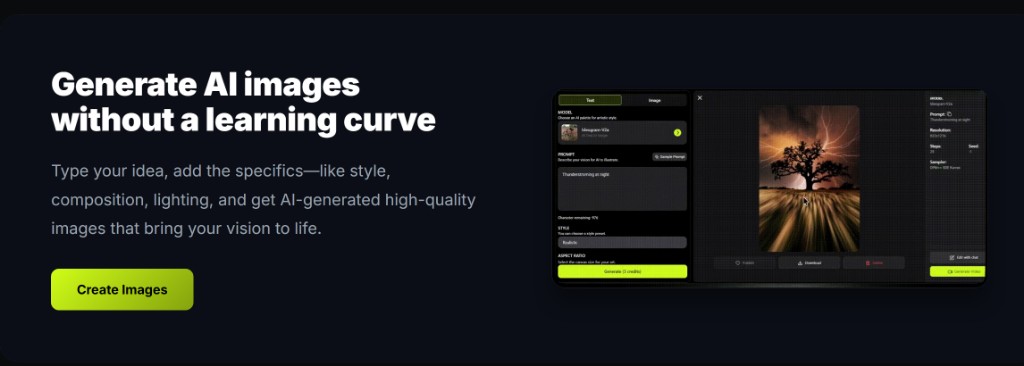
On the deep-imager AI image generator, switching models does not wipe your prompt — so you can compare looks without rebuilding the brief.
Change the model. Read the new credit cost. Generate once.
What stays in the box when you change models?
Your prompt text stays. Style, aspect ratio, and quantity refresh to what the new model supports.
Open the Model select in the workspace. The list is filtered by the active mode — text to image, image to image, watermark remove, or video. Pick another still model and the brief you typed remains.
That is the point of one AI image generator dashboard: hop from a cheap draft model to a heavier one without pasting the paragraph again.
How should you A/B models on text to image?
Lock subject, light, and ratio first on a cheap model, then switch once — do not rewrite the prompt for every hop.
Start in text to image with Nano Banana when you only need composition proof. When the still is close, switch to GPT-4o image or the Midjourney-style path and generate again with the same sentences.
Change one variable: the model. If you also rewrite Style and half the prompt, you cannot tell which change won. For a longer side-by-side, see Midjourney-style vs GPT-4o.
- Read the Generate button after every model change.
- Keep quantity at 1 until one model wins.
- Stop after two hops; a third usually means the brief is wrong, not the model.
Does image to image keep the upload when you switch models?
Yes — the source image and prompt stay; only the model (and its supported options) change.
Stay in image to image when the layout must hold. Switching models mid-remix is for a different render engine, not a new sketch. If the new model hides Style or quantity, that is expected — those controls follow the model card.
Watermark Remove still locks to Nano Banana. Do not expect every still model to appear in that tab.
Do you pay twice just for switching models?
No — switching is free; each Generate after a switch spends that model’s credit cost.
New accounts have 5 free credits. Plans are on pricing from $1/month (Basic 10 credits, Advanced $9.99 for 120, Professional $19.99 for 300). Failed jobs that the product marks failed return the credit.
Typical still time is 30 seconds–2 minutes. Read how credits work for live per-model rates on the Generate button before you hop to a video model such as Sora 2 or Veo 3.
| Step | Credits | Tip |
|---|---|---|
| Change model | 0 | Prompt stays in the box |
| First cheap still | Model cost × 1 | Prove framing first |
| Second model hop | New model cost × 1 | Same prompt, new engine |
| Video after a still | Higher — check button | Describe motion, not a new scene |