Make Same is the shortest path from a public still to a new generate on the deep-imager AI image generator.
Copy the prompt, spend one credit, then remix — do not retype the brief from memory.
What does Make Same copy into the workspace?
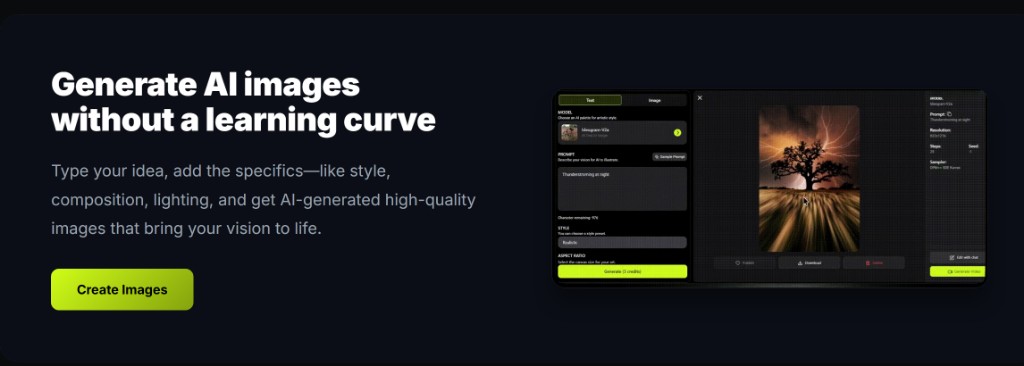
Make Same loads the public still’s original prompt into the AI image generator; if that still was image to image, it also loads the source file.
You find this on gallery cards and on each gallery detail page. The workspace opens with the prompt filled so you do not reconstruct lighting, subject, and ratio from a thumbnail.
Text to image gallery picks copy the brief only. Image to image picks copy the brief plus the reference, because that mode needs a source image.
Record what worked: model name, ratio, and the exact prompt line that survived review. That notebook becomes your reusable playbook across ecommerce, social, and concept batches.
On deep-imager, treat the AI image generator as a credit-aware studio: lock aspect ratio, pick the model, then write the prompt so text to image spends once on a usable frame.
When should you keep text to image after Make Same?
Keep text to image when the gallery still is close enough and you only need a new roll of the same brief.
Edit one clause — color, crop, or time of day — then generate. A full rewrite wastes the copied prompt and behaves like a blank text to image start.
For a cheap first roll, pick Nano Banana. Move to GPT-4o image only if the still needs readable type or a poster grid.
Record what worked: model name, ratio, and the exact prompt line that survived review. That notebook becomes your reusable playbook across ecommerce, social, and concept batches.
On deep-imager, treat the AI image generator as a credit-aware studio: lock aspect ratio, pick the model, then write the prompt so text to image spends once on a usable frame.
- Keep the copied aspect ratio unless the destination channel changed.
- Change one variable per generate so you can tell what worked.
- Stop after two misses; the brief may not match what you actually need.
When should Make Same switch to image to image?
Switch to image to image when you must keep the gallery composition and change only background, color, or a small prop.
Upload the gallery result (or keep the loaded source) and describe the delta in natural language. That is the same image to image path used for sketches and pack shots.
Social crops after a remix are covered on the social media use case. Do not restart text to image just to move from 1:1 to 9:16 if the subject must stay put.
Record what worked: model name, ratio, and the exact prompt line that survived review. That notebook becomes your reusable playbook across ecommerce, social, and concept batches.
On deep-imager, treat the AI image generator as a credit-aware studio: lock aspect ratio, pick the model, then write the prompt so text to image spends once on a usable frame.
How many credits does a Make Same session use?
Make Same itself does not spend a credit; each generate after it does, same as any other run.
New accounts have 5 free credits. Plan one copied text to image plus one image to image correction. If you need a set of variants, pricing from $1/month lists Basic at 10 credits, Advanced at $9.99 for 120, and Professional at $19.99 for 300.
Failed runs that the product marks failed return the credit. Typical still time is 30 seconds–2 minutes. Read how credits work before a long remix loop.
Record what worked: model name, ratio, and the exact prompt line that survived review. That notebook becomes your reusable playbook across ecommerce, social, and concept batches.
On deep-imager, treat the AI image generator as a credit-aware studio: lock aspect ratio, pick the model, then write the prompt so text to image spends once on a usable frame.
| Step | Credits | Why |
|---|---|---|
| Open Make Same | 0 | Loads prompt and optional source |
| First text to image | 1 | New still from the copied brief |
| One image to image fix | 1 | Keeps layout, changes one detail |
| Extra rolls | 1 each | Same wallet as a blank start |
How do you keep quality high without wasting credits?
Lock ratio first, run one strong text to image pass, then refine with image to image instead of endless fresh prompts.
Before you click Generate, confirm the credit cost on the button and the aspect ratio for the channel you will actually publish to.
If the model returns a safety or policy error, rewrite the prompt without protected names or sensitive requests rather than retrying the same blocked wording.
For team handoff, save the winner still and the prompt in your dashboard history so the next editor can Make Same or continue with image to image.
On deep-imager, treat the AI image generator as a credit-aware studio: lock aspect ratio, pick the model, then write the prompt so text to image spends once on a usable frame.